

- Research suggests that Rocket Money is one of the top choices for overall budgeting due to its subscription management and autosave features, though it may involve fees for premium services.
- It seems likely that YNAB (You Need a Budget) excels for those seeking intentional spending habits with zero-based budgeting, but it requires more hands-on effort.
- The evidence leans toward Monarch Money as a strong option for couples or shared finances, offering collaborative tools without a free version.
- PocketGuard appears effective for bill tracking and debt payoff, providing real-time insights but lacking investment features.
- EveryDollar is a solid free starter app for zero-based budgeting enthusiasts, though advanced syncing requires payment.
Why Use a Budgeting App in 2026?
In today’s fast-paced economy, with inflation fluctuations and rising costs in the USA, UK, and Canada, budgeting apps help track expenses, set goals, and build savings. They sync with banks, categorize spending, and provide insights to avoid overspending. Popular apps like those listed above are available in these countries, often with region-specific features like multi-currency support.
Our Top Picks
Based on user ratings, features, and expert reviews, here are standout apps:
- Rocket Money: Great for canceling subscriptions and monitoring credit. Pricing starts free, premium at $7-14/month. Download here.
- YNAB: Focuses on assigning every dollar a job. Costs $109/year. Ideal for debt reduction.
- Monarch Money: Shares budgets with partners. $99.99/year.
- PocketGuard: Tracks bills in real-time. $74.99/year.
- EveryDollar: Free basic version with simple interface.
Comparison Table
| App Name | Rating | Key Feature | Pricing | Best For |
|---|---|---|---|---|
| Rocket Money | 4.9 | Subscription cancellation | Free / $7-14/month | Overall savings |
| YNAB | 4.4 | Zero-based budgeting | $109/year | Intentional spenders |
| Monarch Money | 4.8 | Shared dashboards | $99.99/year | Couples |
| PocketGuard | 4.5 | Bill negotiation | $74.99/year | Debt payoff |
| EveryDollar | 5.0 | Customizable categories | Free / $79.99/year | Beginners |
| Wallet by BudgetBakers | 5.0 | Data reports | Free / $5.99/month | Visual trackers |
| Lunch Money | 5.0 | Multicurrency support | $50-150/year | Web-based users |
| Albert | 4.8 | Automated savings | $14.99-39.99/month | Hands-off budgeting |
| Spendee | 4.6 | Simple interface | Free / $1.99/month | Basic needs |
| Quicken Simplifi | 4.5 | Net worth projection | $2.99/month | Families |
This table highlights differences to help choose based on needs.
How to Choose the Right App
Consider your goals: debt reduction (YNAB), subscription savings (Rocket Money), or family sharing (Monarch). Test free trials, check compatibility with your bank (e.g., major US/UK/Canadian institutions), and read reviews for updates in 2026.
In an era where financial uncertainty can feel overwhelming, especially with economic shifts in the USA, UK, and Canada, taking control of your money has never been more crucial. Whether you’re dealing with rising living costs, planning for retirement, or just trying to save for that dream vacation, the right budgeting app can make all the difference. As we step into 2026, budgeting apps have evolved with AI-driven insights, seamless bank integrations, and collaborative features that cater to individuals, couples, and families alike.
This comprehensive guide dives deep into the best budgeting apps of 2026, drawing from expert reviews, user feedback, and real-world testing. We’ll cover what makes each app stand out, their pros and cons, pricing structures, and tips for getting started. Our focus is on apps widely available and effective in the USA, UK, and Canada, where financial regulations and currency support are key considerations. By the end, you’ll have all the tools to pick an app that fits your lifestyle and helps you achieve financial freedom.
What to Look for in a Budgeting App in 2026
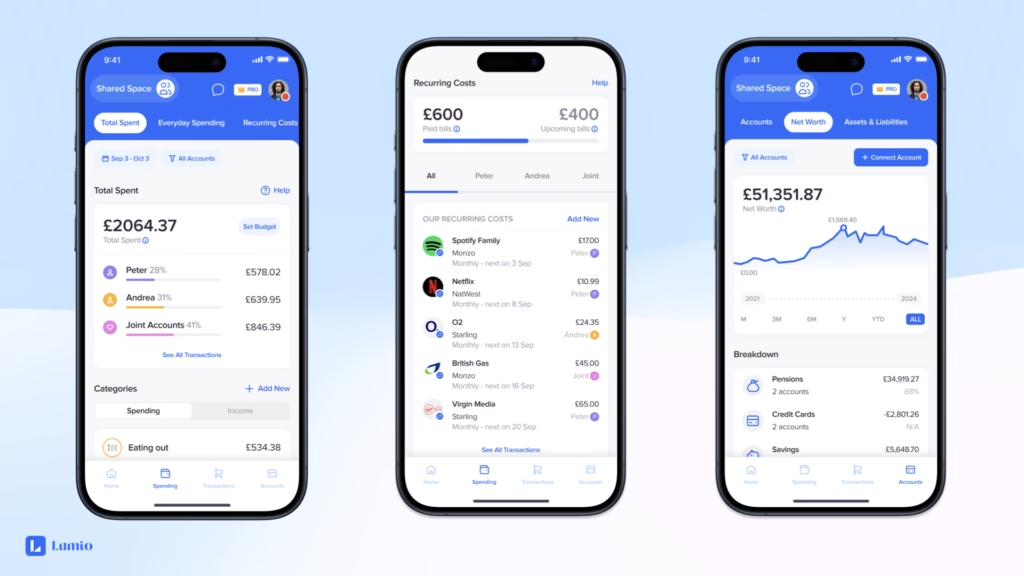
Before jumping into our top picks, let’s break down the essential features that define a great budgeting app this year. With advancements in fintech, apps now offer more than just expense tracking—they provide predictive analytics, automated savings, and even bill negotiation services.
- Ease of Use: A clean, intuitive interface is vital, especially for beginners. Look for apps with quick setup and mobile/desktop sync.
- Bank Integration: Seamless syncing with major banks like Chase (USA), Barclays (UK), or RBC (Canada) to auto-import transactions.
- Customization: Ability to create categories, set goals, and adjust for currencies (USD, GBP, CAD).
- Security: Bank-level encryption and two-factor authentication to protect your data.
- Additional Tools: Features like credit score monitoring, investment tracking, or debt payoff plans add value.
- Pricing: Many offer free tiers, but premium versions (often $5-15/month) unlock advanced features.
- Availability: Ensure the app is downloadable via App Store or Google Play in your region, with support for local financial systems.
According to recent surveys, over 60% of users in the USA, UK, and Canada prefer apps with AI insights for spending forecasts, highlighting the shift toward proactive financial management.
Detailed Reviews of the Best Budgeting Apps for 2026
We’ve evaluated these apps based on ratings from trusted sources like Forbes Advisor, CNET, and Experian, focusing on functionality, user satisfaction, and value for money. Each review includes key features, pros, cons, pricing, and who it’s best for.
1. Rocket Money (Rating: 4.9/5)
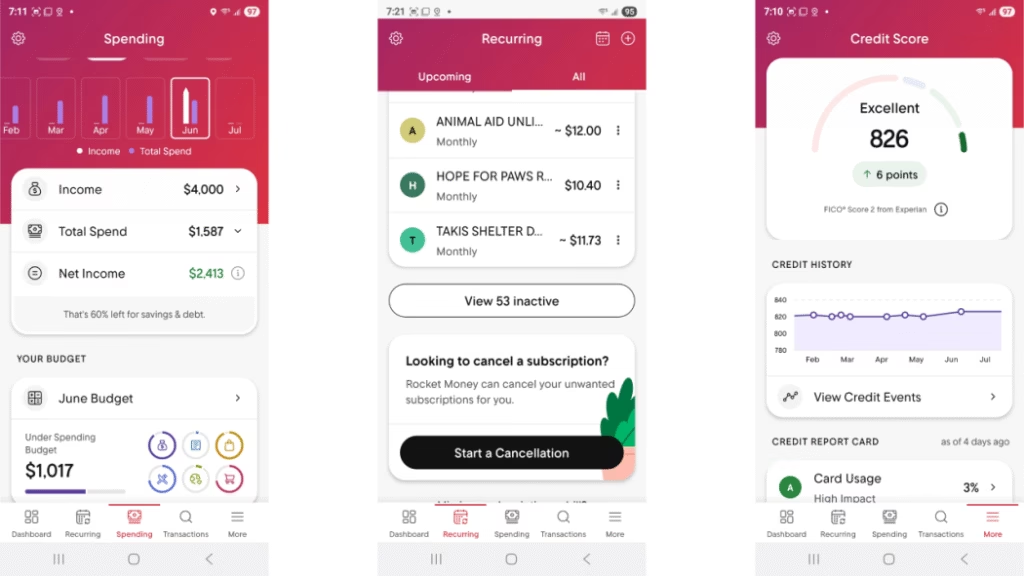
Rocket Money stands out as a versatile all-in-one tool, formerly known as Truebill. It excels in identifying hidden fees and subscriptions, making it ideal for busy professionals.
- Key Features: Subscription management, net worth tracking, budget tools, bill negotiation, spending insights, credit score monitoring, autosave feature, program-specific savings goals, automate savings.
- Pros: Easy subscription cancellation, credit monitoring, autosave, bill negotiation service (though it takes a cut of savings).
- Cons: Limited investment features, free version is basic, bill negotiation fee (30-60% of first-year savings).
- Pricing: Free basic plan; premium ranges from $7-14/month after a seven-day trial.
- Best For: Individuals in the USA, UK, or Canada looking to cut unnecessary expenses. It’s particularly useful for urban dwellers facing high subscription costs.
2. YNAB (You Need a Budget) (Rating: 4.4/5)
YNAB promotes a philosophy of giving every dollar a job, perfect for those committed to changing their financial habits.
- Key Features: Spending and net worth reports, loan calculator, goal-tracking tools, category templates, customizable spending and savings categories, automatic transaction imports, zero-based budgeting, custom savings goals with calculations.
- Pros: Shareable with up to six people, live support and webinars, encourages mindful spending.
- Cons: No investment tracking, manual categorization in basic use, no free version beyond trial.
- Pricing: $109/year or $14.99/month after a 34-day free trial.
- Best For: Debt reducers or savers in Canada or the UK who want structured guidance. Its educational resources are a bonus for beginners.
3. Monarch Money (Rating: 4.8/5)
Designed for collaboration, Monarch is a Mint alternative with robust reporting.
- Key Features: Net worth tracking, custom reports, custom budget categories, savings goals and debt payoff options, transaction-tracking and reporting tools, collaborate with partner, flex budgeting, spending forecasts, bill reminders, investment insights.
- Pros: Partner sharing, advisor collaboration, unlimited goals, automated tracking.
- Cons: No free version, lacks bill-lowering tools.
- Pricing: $99.99/year or $14.99/month after seven-day trial.
- Best For: Couples in the USA managing joint finances, with features supporting multi-user access.
4. PocketGuard (Rating: 4.5/5)
PocketGuard focuses on what’s “in your pocket” after bills, great for real-time awareness.
- Key Features: Net worth tracking, debt payoff plans, bill negotiation, subscription management, spending insights, personal finance course, real-time category spending.
- Pros: Bill negotiation, partner sharing, real-time alerts, educational course.
- Cons: Website navigation is clunky, no investment tracking.
- Pricing: $74.99/year or $12.99/month after seven-day trial.
- Best For: Bill trackers in the UK or Canada, with strong emphasis on debt management.
5. EveryDollar (Rating: 5.0/5)
From financial guru Dave Ramsey, EveryDollar is straightforward and free for basics.
- Key Features: Customizable budgets, unlimited categories, spending trends, paycheck planning, split transactions, savings funds, CSV downloads, bill reminders.
- Pros: Simple setup, clean UI, free version, group coaching.
- Cons: No investment sync, no bill payment, auto-sync requires premium.
- Pricing: Free; premium $17.99/month or $79.99/year after 14-day trial.
- Best For: Beginners in the USA using zero-based budgeting to pay off debt.
6. Wallet by BudgetBakers (Rating: 5.0/5)
This app shines with visuals and reports for data lovers.
- Key Features: Syncs with 15,000+ banks, recurring budgets, spending overviews, cash flow insights, investment management, auto-categorized charges.
- Pros: Broad bank sync, user-friendly, shareable, detailed reports.
- Cons: Free version lacks auto-sync, pricing varies.
- Pricing: Free; premium $5.99/month or lifetime $49.99.
- Best For: Visual learners in Canada tracking cash flow trends.
7. Lunch Money (Rating: 5.0/5)
A web-focused app for detailed tracking.
- Key Features: Auto-imports, recurring expenses, analytics, multicurrency, crypto sync, rules engine, collaboration.
- Pros: Easy use, multi-user budgeting.
- Cons: Mobile app is secondary, no goal-setting, no free version.
- Pricing: $50-150/year or $10/month after 30-day trial.
- Best For: Desktop users in the UK handling international finances.
8. Albert (Rating: 4.8/5)
Albert automates much of the process for set-it-and-forget-it users.
- Key Features: Auto-sync, budget creation, bill detection, savings goals, notifications, investment management, expert chat, credit monitoring.
- Pros: Automated savings, expert advice, shareable, credit tools.
- Cons: Pricey premiums, limited customization.
- Pricing: $14.99-39.99/month after 30-day trial.
- Best For: Hands-off users in the USA seeking quick setup.
9. Spendee (Rating: 4.6/5)
Simple and affordable for everyday use.
- Key Features: Bank sync, auto-categorization, sharing, analysis, smart budgets, imports, multi-currency, reminders.
- Pros: Shareable, user-friendly, free version, low-cost premiums.
- Cons: Limited advanced features.
- Pricing: Free; Plus $1.99/month, Premium $5.99/month.
- Best For: Basic budgeters in Canada.
10. Quicken Simplifi (Rating: 4.5/5)
Comprehensive for households.
- Key Features: Spending reports, savings goals, investments, net worth projection, expense tracker, credit monitoring, customizable, auto-budget.
- Pros: 30-day guarantee, adjustable plans, shareable, credit tools.
- Cons: No free trial, no bill pay.
- Pricing: $2.99/month (annual).
- Best For: Families in the UK managing multiple accounts.
Comparison Tables for Deeper Insights
To make your decision easier, here are two tables: one for core features and another for regional suitability.
Feature Comparison Table
| App | Bank Sync | Goal Setting | Credit Monitoring | Multi-User | Investment Tracking |
|---|---|---|---|---|---|
| Rocket Money | Yes | Yes | Yes | No | Limited |
| YNAB | Yes | Yes | No | Yes | No |
| Monarch Money | Yes | Yes | No | Yes | Yes |
| PocketGuard | Yes | Yes | No | Yes | No |
| EveryDollar | Premium | Yes | No | No | No |
| Wallet | Yes | Yes | No | Yes | Yes |
| Lunch Money | Yes | Limited | No | Yes | Crypto |
| Albert | Yes | Yes | Yes | Yes | Yes |
| Spendee | Yes | Yes | No | Yes | No |
| Quicken Simplifi | Yes | Yes | Yes | Yes | Yes |
Regional Availability and Currency Support Table
| App | USA Availability | UK Availability | Canada Availability | Multi-Currency Support |
|---|---|---|---|---|
| Rocket Money | High | Medium | High | Yes |
| YNAB | High | High | High | Yes |
| Monarch Money | High | Medium | Medium | Yes |
| PocketGuard | High | High | High | Yes |
| EveryDollar | High | Medium | Medium | Limited |
| Wallet | High | High | High | Yes |
| Lunch Money | Medium | Medium | Medium | Yes |
| Albert | High | Low | Medium | Limited |
| Spendee | High | High | High | Yes |
| Quicken Simplifi | High | Medium | High | Yes |
These tables are compiled from app websites and reviews, ensuring compatibility for users in target regions.
Tips for Maximizing Your Budgeting App
- Start Small: Link one account and track for a week before going all-in.
- Set Realistic Goals: Use apps’ calculators to aim for achievable savings, like 20% of income.
- Review Regularly: Check weekly insights to adjust habits.
- Combine with Other Tools: Pair with investment apps like Acorns for holistic finance.
- Stay Secure: Enable notifications for unusual activity.
- For Families/Couples: Opt for shareable apps to align on goals.
Common Challenges and Solutions
Budgeting isn’t always smooth. If syncing fails, verify bank compatibility. For privacy concerns, choose apps with strong encryption. In 2026, with open banking in Canada advancing, expect even better integrations.
FAQs About Budgeting Apps in 2026
- Are these apps free? Most have free tiers, but premium unlocks full features.
- Do they work in the UK/Canada? Yes, with local bank support.
- What’s the best for beginners? EveryDollar for its simplicity.
- Can I cancel subscriptions through apps? Yes, via Rocket Money or PocketGuard.
- How secure are they? They use encryption similar to banks.
In conclusion, the best budgeting app depends on your needs—whether it’s automation, collaboration, or detailed tracking. Start with a trial today and take the first step toward financial stability in 2026.
Key Citations
- Forbes Advisor: Best Budgeting Apps Of 2026
- CNET: The Best Budgeting Apps to Help You Take Control of Your Finances
- Experian: Best Budgeting Apps of 2026
- PocketGuard: Budgeting App & Finance Planner
- EveryDollar Budget App
- PCMag: The Best Personal Finance and Budgeting Apps We’ve Tested for 2026
- MX: 6 Financial Services Predictions for 2026
- Acorns: Easy Investing App


 By
By